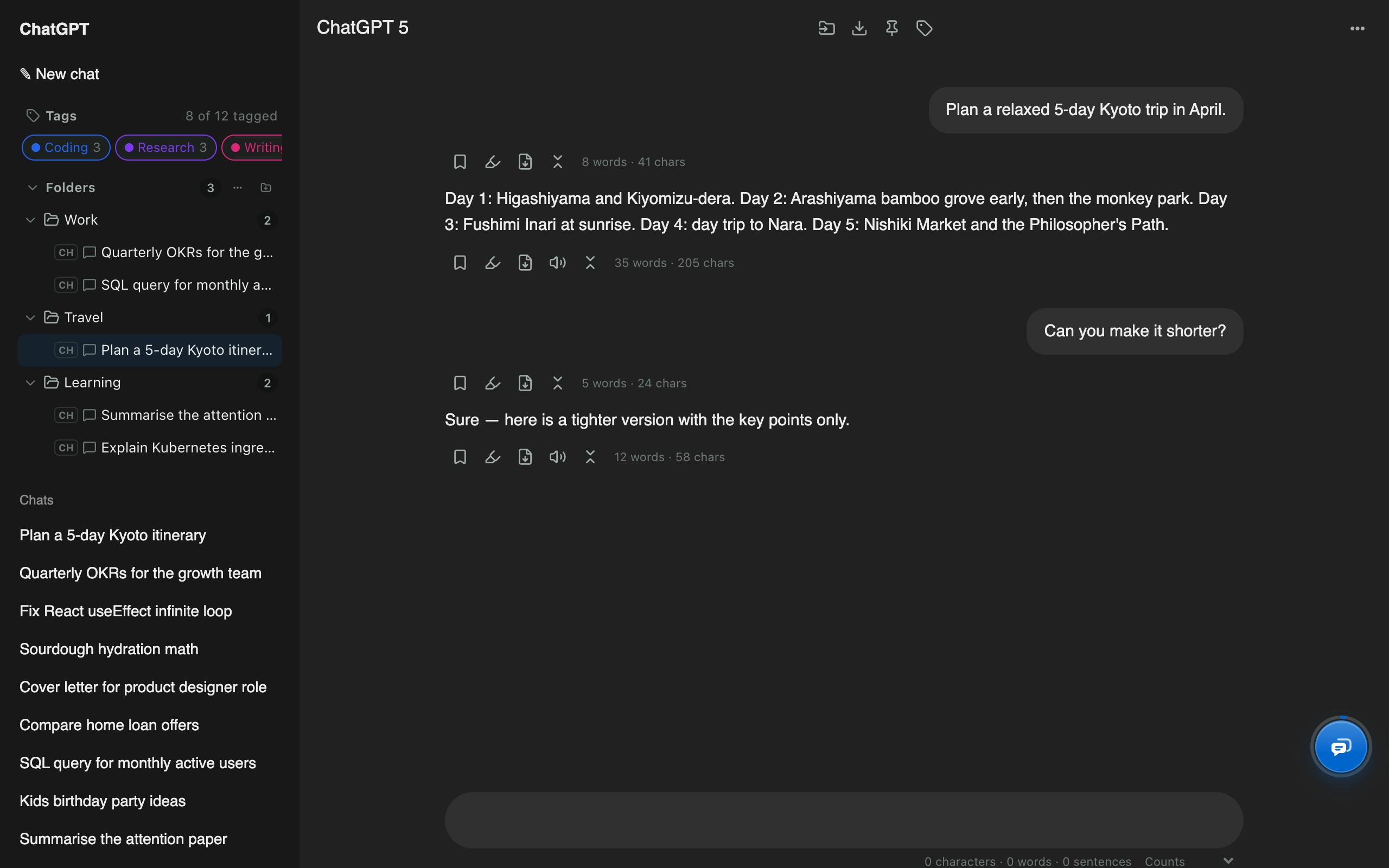
ChatGPT folders

Folders for ChatGPT, right in the sidebar.

Nested folders appear inside ChatGPT's own sidebar. Drag a chat onto a folder to file it, pin the chats you use daily, and hide everything you've already filed.

Add to Chrome, free Works in Edge and Brave too · Firefox soon Read the step-by-step guide
  • Free
  • Made on your device
  • ChatGPT, Claude, Gemini, Grok
ChatGPT sidebar with Work, Travel and Learning folders added by AI Chat Tools

ChatGPT folders: quick facts

FoldersUnlimited, nested to any depth, with colours, stars and sorting
FilingDrag and drop, the top-bar folder button, or in bulk
One chat, many foldersYes. Add keeps other folders; Move replaces them
Across sitesOne folder can hold ChatGPT, Claude, Gemini and Grok chats
Also includedPinned chats, automatic and custom tags, hide filed chats
PriceFree

How to use it

  1. Click the new-folder icon in the Folders section of the ChatGPT sidebar.
  2. Name the folder and press Enter.
  3. Drag a chat from ChatGPT's list onto the folder (hold Alt to move instead of add).

ChatGPT Projects vs AI Chat Tools

Organising chats: ChatGPT Projects vs AI Chat Tools folders
TaskChatGPT ProjectsAI Chat Tools
Nested subfoldersNoYes, any depth
Same chat in two placesNoYes
Chats from Claude, Gemini and GrokNoYes
Shared files and instructionsYesNo (use Projects for that)
Hide organised chats from the main listNoYes

Does ChatGPT have folders?

Not nested ones. ChatGPT Projects group chats around shared files and instructions; AI Chat Tools adds lightweight folders that nest, overlap and span sites. Many people use both: Projects for working context, folders for filing.

How do folders, pins and tags work together?

  • Folders hold chats by project or client.
  • Pins keep the few chats you open every day at the top of the sidebar.
  • Tags label topics automatically (Coding, Writing, Research…) and with your own keyword rules.

How do I keep ChatGPT’s chat list tidy?

Turn on Hide filed chats from the site’s list in Settings. ChatGPT’s own list then shows only chats you haven’t organised yet, a natural inbox. Old chats you don’t need? Bulk delete them.

Can I find a chat that’s in a folder?

Yes: open the folder, or search every message and jump straight to the match.

ChatGPT folders: common questions

Does ChatGPT have folders?

ChatGPT has Projects, which group chats with shared files and instructions, but no nested folders. AI Chat Tools adds nested folders to the sidebar alongside Projects.

How many folders can I create?

As many as you like, nested as deep as you like. There is no folder limit.

Where are my folders stored?

In your browser on your device. Settings → Data → Download backup saves them to a file you can restore on another computer.

Can a folder mix ChatGPT and Claude chats?

Yes. Each chat shows a small badge for its site and opens on the right one.

Free for Chrome, Firefox & Edge

Your AI chats, finally organised

Folders, export, bulk delete and search for ChatGPT, Claude, Gemini and Grok. Free, and your chats never leave your device.

Add to Chrome, free Works in Edge and Brave too · Firefox soon Read the guides